HOME / Posts Tagged: HTML5
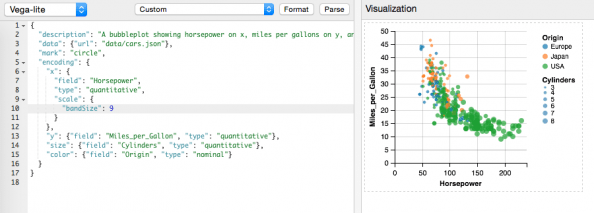
Vega-Lite: producing complex visualisations with minimal amount of code
Here is an interesting visualisation library released just a few days ago from the University Washington Interactive Data Lab. Vega-Lite is a high-level visualization grammar. It provides a concise JSON syntax for supporting rapid generation of visualizations to support analysis. Vega-Lite can serve as a declarative format for describing and creating data visualizations. Vega-Lite specifications [Continue reading]

Flybys: Strava replays an entire race
Available for some time in test mode, Flybys is a (now more prominently displayed) feature from Strava that allows you to replay multiple runs of users of the platform. It is available for all activities, even your training runs, but is more fun for full races were there are much more users matching your data. [Continue reading]

Chart.js: cross-browser, animated, HTML5 charts
//Non-Flash charts is a favourite topic of mine (see more here http://bit.ly/g-chart), basically because charts have been one of the last things Flash could do that HTML couldn’t. This of course has been changing a lot the last few years. Another very recent (released yesterday!) example of is Chart.js. It packs: – 6 animated chart types: [Continue reading]

Going Fullscreen with HTML5
// Up until recently, having a web page running in full screen was not possible, left only for #Flash -based sites. The best you could do was remove the menu/location bars but still the window frame remained. This has changed with the #HTML5 #Fullscreen API which allows handling full-screen capability of the browser via #javascript [Continue reading]

Page flip effect with jQuery
Burn Flash, burn Here’s another use of Flash that can be converted to #HTML5 / #CSS3 : turn.js provides an easy to setup page-flip effect with just a few lines of codes. Get it here http://bit.ly/FOHmkX and also check out this tutorial of an Instragram-powered "magazine" using turn,js http://bit.ly/ym1cDo Google+: Reshared 3 times Google+: View [Continue reading]

Right-click menus in HTML5
The image below is from the future. :) It shows a context-related right-click menu implemented with just a few lines of #HTML5 code. This is already part of the official HTML 5 spec but is only supported by Firefox at the moment. The spec describes menus that are related to a section, can have sub-menus [Continue reading]

HTML5 Tags Cheat Sheet
A helpful cheat sheet of #HTML5 tags by www.inmotionhosting.com (via +Andrew Maxwell)Full resolution: https://markg.blog/2012/01/10/html5-tags-cheat-sheet/html5_cheat_sheet_tags/ Google+: Reshared 1 times

Excellent #HTML5 work!
This really pushes the boundaries of what we consider can be done with HTML :) Reshared post from +Marcin Wichary We open sourced the code behind Stanisław Lem doodle and I wrote an article describing it. Hope you enjoy! http://www.html5rocks.com/en/tutorials/doodles/lem/http://code.google.com/p/stanislaw-lem-google-doodle/ Embedded Link HTML5 Rocks – Case Study: Building the Stanisław Lem Google doodle Google+: Reshared [Continue reading]

Another victory for #HTML5 and #CSS3
The next version of the Kindle books format will support HTML5 and CSS3, moving away from the Mobi format. Of course it continues to be a shame (and a non-starter for me) that Kindle doesn’t support #EPUB … Embedded Link Kindle Format 8 Overview Kindle Format 8 Overview Google+: Reshared 1 times Google+: View post [Continue reading]
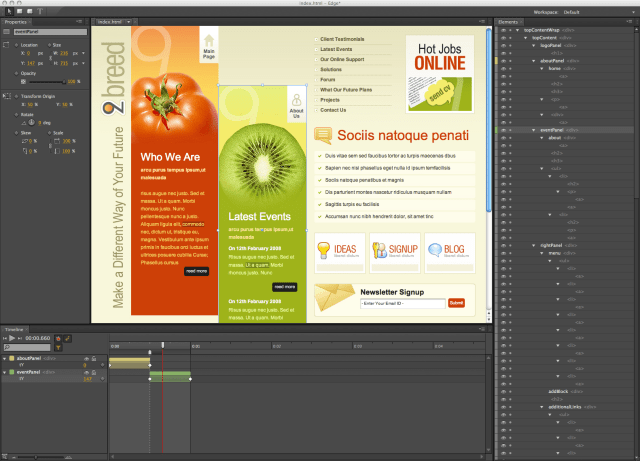
Trying out Adobe Edge (Adobe Edge brings Flash design to HTML5)
For all the talk of how HTML5 will be the future of the Web, and how, in particular, it will replace Flash for rich interactive and animated content, the reality is that the technology is out of reach for a lot of the designers and animators currently using Flash. While HTML5 developers are working directly [Continue reading]

Swiffy: convert SWF files to HTML5
Today we’re making the first version of Swiffy available on Google Labs. You can upload a SWF file, and Swiffy will produce an HTML5 version which will run in modern browsers with a high level of SVG support such as Chrome and Safari. It’s still an early version, so it won’t convert all Flash content, [Continue reading]